Learn why the world’s most popular website platform is so successful.
WordPress is one of the most popular content management systems (CMS) in the world. Thanks to its flexibility and ease of use, WordPress has become the first choice for many people, whether they’re new to building websites or professionals.
If you want to create a website or blog, WordPress gives you the tools you need without deep programming knowledge.
In this article, we’ll cover everything you need to know about WordPress, from its history to its key features and the reasons for its popularity, and how to use it to build professional websites.
The History of WordPress
WordPress was first released in 2003 by Matt Mullenweg and Mike Little.
The WordPress project started as a fork of a blogging platform called b2/cafelog. Its founders wanted to offer an easier, more flexible alternative. Since then, WordPress has grown into a complete content management system, and it now powers more than 40% of websites worldwide.
WordPress is also open source, which means anyone can contribute to it or customize it. Being open source has helped WordPress grow very quickly, thanks to the large community of developers and users behind it.
What Is WordPress?
WordPress is a content management system (CMS).
It lets users create and manage websites easily. It has a simple interface and powerful tools that let users fully customize their sites without extensive, complex programming knowledge.
Whether you want to create a personal blog, an online store or a company website, WordPress gives you all the tools you need.
There are also two versions of WordPress, and it’s important to know the difference:
- WordPress.com: a fully hosted service that lets users create websites quickly without buying hosting or installing any software. The free version comes with limits, but paid plans offer more features.
- WordPress.org: the self-hosted version. You download the software and install it on your own hosting server. This version gives you full control over your website, including the ability to install any plugins and customize the code however you like.
Key Features of WordPress
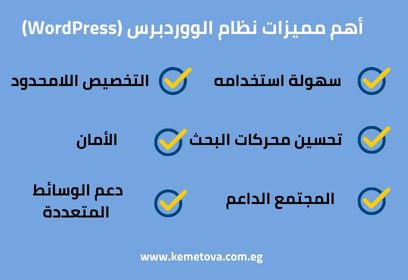
One reason WordPress is so popular is the wide range of features it offers. Here are some of the most notable:
- 1. Ease of use
People with no programming experience can build professional websites with WordPress. It gives them an easy-to-use dashboard for managing content, customizing the design and adding components.
2. Unlimited customization
WordPress supports thousands of themes and plugins anyone can use to customize their site. Whether you want to change the whole design or add a new feature such as an online store or a contact form, there’s always a ready-made solution with WordPress.
3. Search engine optimization (SEO)
WordPress is designed to be search engine friendly, and there are many SEO plugins, such as Yoast SEO, All in One SEO and Rank Math. Any of these plugins can do a lot to optimize your site for search engines such as Google and Bing, which helps your site appear in search results. Learn more about what SEO is.
4. Security
Thanks to constant updates and the large community behind it, WordPress is safe to use. As with any other system, you should take extra steps, such as installing security plugins, using strong passwords and updating software regularly, to prevent security breaches.
5. A supportive community
As an open-source project, WordPress is backed by a large community of developers, programmers and users. Whether you need technical help or want to learn more about improving websites with WordPress, there are plenty of resources available.
6. Multimedia support
WordPress supports a wide range of media, so you can easily upload images, videos, audio and even documents, and embed content from other sites such as YouTube.
How to Build a Website with WordPress
To build a website with WordPress, follow these basic steps:
- Choose your hosting and domain name
The first step in building a WordPress website is choosing a web hosting service. Many hosting companies offer plans made for WordPress, such as SiteGround, and at Kemetova we offer web hosting and help choosing the right domain for your site. Once you’ve chosen hosting, pick a domain name that reflects your site and your brand.
- Install WordPress
Many hosting companies offer one-click WordPress installs. Once it’s installed, you can start customizing your website with the right theme and plugins.
- Choose the right theme
After installing WordPress, the next step is choosing a theme that suits your site’s design. There are many free and paid WordPress themes, and you can choose among them based on your needs.
- Add your content
Once your theme is installed, you can start adding content. WordPress has a powerful editor called Gutenberg that lets you build pages and posts from ready-made blocks, such as images, headings and text.
- Install the right plugins
Plugins are one of the core parts of WordPress. You can install plugins to improve security and SEO, or to add interactive features, such as building forms with WPForms or creating a complete online store with WooCommerce.
Read also: how to choose the best web design company in Egypt.
Common Uses of WordPress
Thanks to its flexibility, WordPress can be used for a wide range of sites:
1. Blogs
WordPress started as a blogging platform, and it’s still one of the best options for professional blogs. You can manage posts easily, add categories and optimize your content for search engines.
2. Business websites
With powerful plugins such as WooCommerce, you can use WordPress to build a fully functional online store. You can sell products, manage inventory and accept payments online through many payment methods.
3. Education websites
Many educational institutions now use WordPress to build complete learning websites. With plugins such as LearnDash and LifterLMS, you can create online courses and manage students easily and efficiently.
4. Forums and social networks
With plugins such as bbPress and BuddyPress, you can easily turn your website into a forum or an interactive social network.
Optimizing WordPress for Search Engines (SEO)
As we mentioned, WordPress is designed to be search engine friendly, but there are some extra steps you should take to optimize your website:
- Use SEO plugins such as Yoast SEO or Rank Math, which help you optimize your pages and posts with a full analysis of each page and its most common issues.
- Improve site speed: speed has a big effect on SEO, and you can use plugins such as W3 Total Cache to improve your website’s performance and speed.
- Internal and external links: add internal links between your site’s pages, and use external links to trusted sources.
- Use keywords related to your content, choose them carefully and use them naturally in your content and headings.
Over the years, WordPress has shown a huge ability to evolve and adapt to users’ changing needs. Constant updates keep improving performance and security, while new plugins and themes keep expanding what’s available.
With growing attention to responsive design, security and privacy across all websites, WordPress remains one of the leading solutions that meets these requirements.
The move toward simpler design, and growing support for AI and interactive tools, suggest that WordPress will remain a leading choice for building websites.
WordPress is a complete, flexible content management system that suits everyone, from bloggers to large companies. With its large community of developers and users and countless themes and plugins, WordPress gives you everything you need to build a professional, distinctive website.
With constant updates and strong support, WordPress is expected to stay at the forefront of website platforms for years to come. It’s easy to use, but keeping up with its updates takes professionals. If you need a website for your business, get in touch with Kemetova and ask us about everything you want for your website.