
Many companies and individuals today want a presence online, so they invest in a great website design. But many companies fall into common mistakes that can damage their online presence and hurt their visibility in search engines.
In website design and development, common mistakes aren’t just small problems; they can have big consequences for the user experience (UX), search rankings and business performance. In this article, we’ll look at the most important mistakes to avoid when designing a website, with practical ways to avoid them.
The Most Common Website Design Mistakes, and How to Avoid Them
Creating a professional, practical website is one of the main goals for companies and individuals who want a strong online presence. But many make common mistakes that can hold their websites back and make them less effective. Here are two different sites that show the difference between good website design and bad website design:
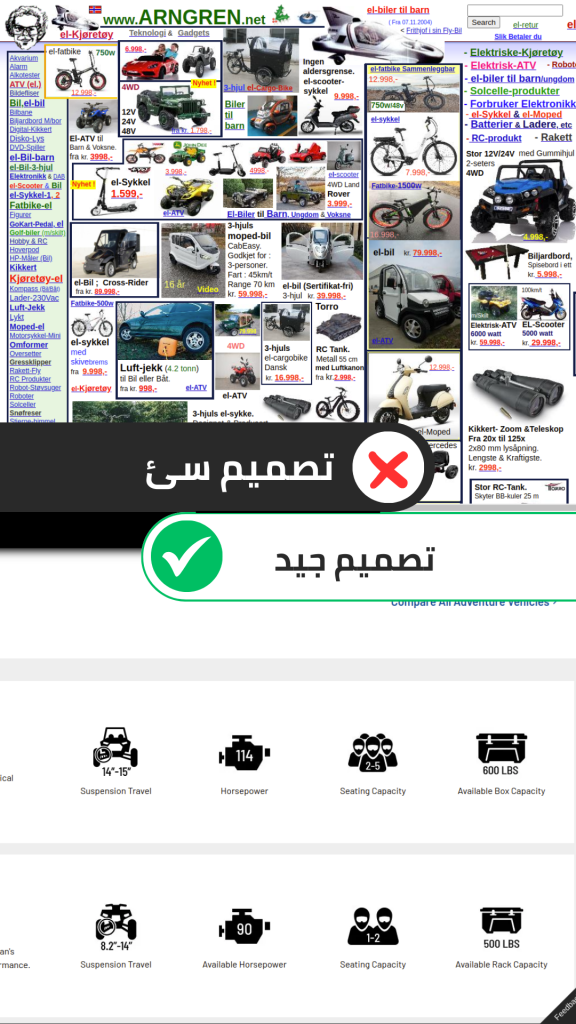
Now let’s look at the most common mistakes people make when designing websites:
A complicated user interface
One of the most common mistakes is neglecting the user in website design. Designs can look great but lack ease of use and easy navigation, which leads to a poor user experience and visitors leaving quickly, with a higher bounce rate and lower engagement.
Navigation and menus are key to guiding visitors and users and helping them find the information they’re looking for easily. Clear navigation matters because it improves the user experience, makes the site and its content easy to browse and helps your website rank better in search engines.
You can avoid this mistake by:
- Designing easy-to-navigate interfaces with clear buttons and an organized layout, so the site is easy to browse for both users and search engine crawlers.
- Running user testing to collect real feedback.
- Using a sitemap so users can reach content easily.
This guide shows you how to improve the user experience (UX) on your website.
A website that isn’t mobile-friendly
More people browse the internet on their phones every day. A website without a responsive design that works on different screens and devices, especially smartphones and tablets, loses a large share of visitors who use their phones, which makes it less successful in search engines.
You can avoid this mistake by:
- Using a responsive design built with CSS media queries.
- Testing the website on different devices and screens before launching it.
- Using tools to check how well your website works on mobile devices, such as the Google Mobile-Friendly Test.
Slow page loading
One reason website designs fail is slow page loading, which leads to a higher bounce rate and lower search rankings.
Website speed is an important factor in the user experience, search rankings and the site’s overall performance. Websites that take a long time to load frustrate visitors and users and stop them from exploring the whole site or completing a purchase, so making your pages load faster is essential for a smooth, effective experience.
You can avoid this mistake when designing a website by following these tips:
- Reduce file sizes and optimize your code by minifying your CSS, JavaScript and HTML files, removing extra characters, white space and unnecessary comments. This makes files smaller and helps pages load faster. You can use optimization tools such as Minify CSS/JS to do this.
- Use a content delivery network (CDN) to speed up page loading. It stores your site’s files on multiple servers around the world, which reduces the distance between the server and the visitor, so pages load faster.
- Turn on browser caching to store static files, such as images and CSS files, on the user’s device and improve performance.
- Use a hosting plan with more resources if your site gets a lot of traffic.
Large images and media files
A slow website can be caused by lots of high-quality media on every page that hasn’t been optimized. Large media files take up more space and slow your pages down, which hurts user satisfaction and search rankings. Make sure the media you add to your website is small, ideally no more than 100 KB per file.
Follow these tips to reduce the size of images and media:
- Compress images with tools such as TinyPNG or ImageOptim.
- Use lazy loading for media to improve speed.
Poor contrast and color choices
Using inconsistent colors and ignoring the contrast between text and backgrounds makes your content hard to read, which hurts users and makes the design less effective. In a 2022 report, WebAIM found that more than 80% of website homepages had low-contrast text.
You can avoid this mistake by:
- Using colors that match your brand identity. You can use color sites such as Color Hunt.
- Making sure your text is legible with tools such as a contrast checker.
- Choosing clear, readable fonts in suitable sizes.
Neglecting SEO when designing a website
Designing a website without following SEO standards, such as headings, keywords and load speed, hurts how your site ranks in search engines such as Google, which means less visibility and fewer visitors.
Here are some key factors to consider for SEO when designing a website:
- Structure your site with H1 to H6 headings in a logical order.
- Optimize images with alt text.
- Use keywords appropriately in your headings, content and meta descriptions.
- Use internal links between pages and related content on your site.
- Make sure each page’s URL is short and describes the page’s content.
No call to action (CTA)
Leaving out clear calls to action that encourage visitors to take a specific action, such as subscribing or buying, means missing chances to turn visitors into customers.
Key tips for avoiding this mistake:
- Design attractive, clear CTA buttons, such as “Start now” or “Sign up free.”
- Put your calls to action (CTAs) in strategic places on the site.
- Use clear, eye-catching colors to draw attention.
Weak security
Ignoring website security can lead to data breaches and the theft of sensitive information, which threatens the site’s reputation and costs it users’ trust.
Today, every modern browser shows a padlock to indicate that a site is secure, which makes users feel safe browsing it. Here are the key tips for better security when designing a website:
- Enable HTTPS by installing and enabling an SSL certificate.
- Update the plugins and software used on your website regularly.
- Install firewalls and monitoring tools to detect suspicious activity.
Not testing the site before launch
Launching a website without thorough testing leads to unexpected problems for users, which damages the site’s reputation and loses visitors and potential customers.
When you finish designing a website, test it to make sure there are no errors, including:
- Performance and load speed tests with tools such as Google PageSpeed Insights.
- Checking that the site works on different browsers and devices.
Key Statistics on Website Performance and the Impact of Design
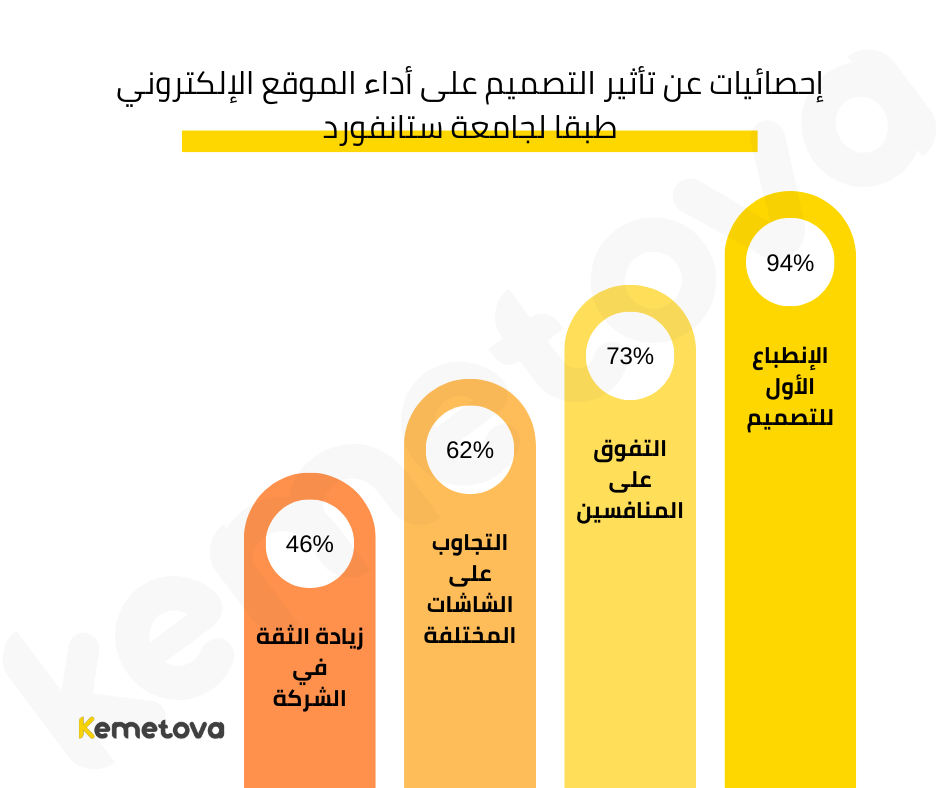
Studies by Stanford University on how design affects website performance and user trust found:
- 94% of internet users form their first impression of a company based on its website design, which makes professional design a top priority.
- 73% of companies that improved their website design succeeded in making visitors see them as distinct from their competitors.
- 62% of companies that invested in making their website design responsive on every screen saw a noticeable increase in sales.
- Design directly affects visitors’ trust: 46% of visitors rely on a company’s website design to judge how much they trust the brand or company.
Source: research from Stanford University.
Tips for Avoiding Website Design Mistakes
Effective website design isn’t just about looks. The design also needs to be easy to use, fast to load and compatible with every mobile device. Here are some tips for avoiding common mistakes when designing websites:
- Before you start designing a website, define its goals and target audience so you can create a design that fits their needs.
- Make sure the design works on every mobile device and that the site functions properly.
- Compress images to reduce their size without affecting quality, reduce file sizes and remove unnecessary code.
- Improve your site’s load speed with specialist tools.
- Use a simple, organized website design that focuses on readability, with consistent, restrained colors.
- Avoid random decorations and shapes that distract visitors and hurt the user experience.
- Design your website with a clear structure that makes it easy to move between pages, and use subheadings to make reading easier.
- Strengthen your SEO with keywords related to your site’s content, so it appears near the top of search results.
- Add clear, distinctive CTA buttons to guide users toward the actions you want, such as buying or signing up.
- Try different designs to find the one that performs best.
- Make sure your website is accessible to as many users as possible, whatever their needs.
Website design is a complex process that balances looks, performance and user experience. By avoiding the mistakes above and following these tips, you can design professional, efficient, effective websites. If you have any questions about designing a professional website for your business, get in touch with the Kemetova team. We offer a full range of high-quality website design services, as well as web hosting and registering a domain that fits your brand name.