
In today’s digital age, website speed is one of the biggest factors in a website’s success. Studies show that a one-second delay in page load time can cut conversion rates by about 7%, which shows how much speed affects the user experience and your ability to win customers.
People are used to finding what they want online easily, with a single click. A slow website can cost you profits and send visitors to competitors with faster sites. But have you thought about what makes websites slow, and how to make yours faster? Many factors slow websites down, and once you deal with them, you’ll improve your site’s speed and performance noticeably.
In this article, we’ll go through the secrets of improving website speed in detail, the most useful tools for doing it and practical solutions you can apply today.
Why Website Speed Matters
In today’s fast-paced world, visitors expect to get what they need instantly and easily. When they click a link, they expect the page to load in under a second, or a few seconds at most. Making your website faster doesn’t just meet visitors’ expectations; it also greatly improves their experience.
Website speed isn’t just a technical feature; it’s essential for a successful user experience. If your site is slow, you can lose visitors quickly, which raises your bounce rate and costs you conversions.
How much does site speed affect the user experience? Here’s how:
- Engagement: fast sites keep users on the site longer and increase engagement with your content.
- Conversion rates: every second of delay directly affects decisions to buy or sign up.
- Trust and credibility: fast websites strengthen their brand’s image and encourage customers to keep coming back.
Better website performance also helps your search rankings. Google has said directly that page speed is an important ranking factor, and it gives fast sites priority in search results.
Learn how to improve the user experience on your site effectively.
The Main Causes of Slow Websites
Slow loading can seriously hurt the user experience, reduce engagement with your content and raise your bounce rate, as this analysis shows:
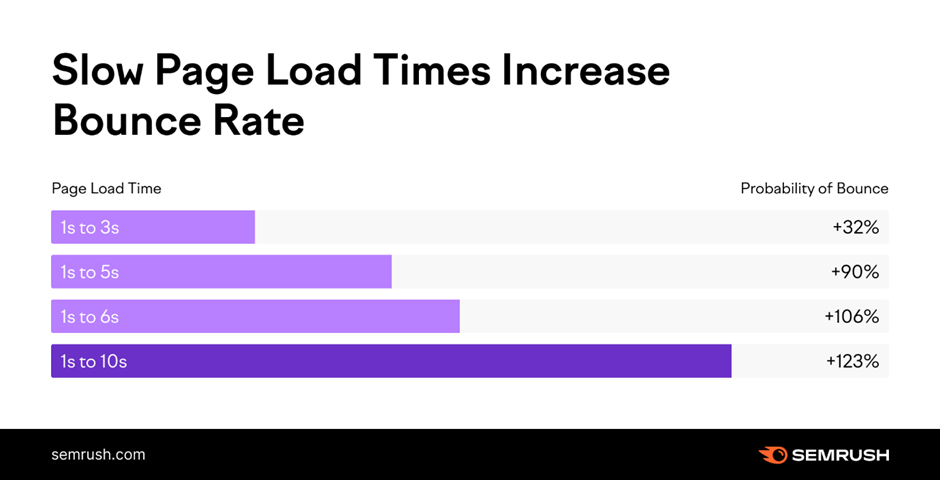
Several common causes lead to slow websites, including:
- Heavy, uncompressed images: large images are one of the biggest factors in website speed. Unoptimized images make pages heavier, which ultimately slows your site down.
- Unoptimized code: lots of uncompressed CSS and JavaScript greatly increases load times.
- A slow hosting server: choosing low-performance web hosting, or a server far from your target audience, increases response times.
- No caching: without caching, the site reloads every element on every visit, which increases response times and slows the site down.
- Too many plugins: these slow sites down, especially sites built with WordPress.
These are the main causes that affect website speed, and we’ll fix them with the steps below.
Practical Steps to Improve Your Website Speed
Now that we know the main causes of slow pages, we can fix them. Here are the most important steps for speeding up your website and improving its performance:
Optimize your images
Images and media files usually make up most of a page’s size, because they’re much bigger than code files and other assets. Reducing their size can do a lot to speed up your website, because the browser has less data to load, which noticeably cuts page load times.
You can compress the images on your website with tools such as TinyPNG or ImageOptim to shrink them without losing quality. As well as compressing images, choose the right formats, such as modern WebP instead of JPEG or PNG.
Optimize your code
The more code a browser has to download from your server and process, the longer it takes to show the page to the user. If your site’s code is very large, it slows your pages down.
You can optimize your site’s code by minifying your CSS and JavaScript files with tools such as Minify, or with WordPress plugins such as Autoptimize, and by removing any unnecessary code to make it run faster.
Also reduce the number of HTTP requests by combining CSS and JavaScript files. Every element on a web page, however small, needs an HTTP request from the browser to the server.
Choose fast, secure hosting
Hosting has a big effect on your site’s speed and performance. The faster your server responds to users’ requests, the faster your site loads and the better the user experience.
Finding the right hosting for your site isn’t easy, but at Kemetova, we offer web hosting on SiteGround’s global servers and manage it for you efficiently.
As well as fast, secure hosting, you can use a content delivery network (CDN) such as Cloudflare: servers around the world that speed up delivery of your content to visitors in different locations. The CDN keeps copies of your files on those servers, and when a visitor requests them, they’re sent from the server nearest to the visitor’s device without them noticing. This shortens the distance files travel across the internet, so they reach users faster, which greatly improves your website’s speed.
Use caching
Caching is a technique that stores your site’s data and files in fast memory, such as RAM, so they can be served to users as quickly as possible. This helps your website respond faster to requests and handle more users at the same time.
You can use caching plugins such as WP Rocket and W3 Total Cache to improve your website’s performance if you run on WordPress.
Monitor your website’s performance regularly
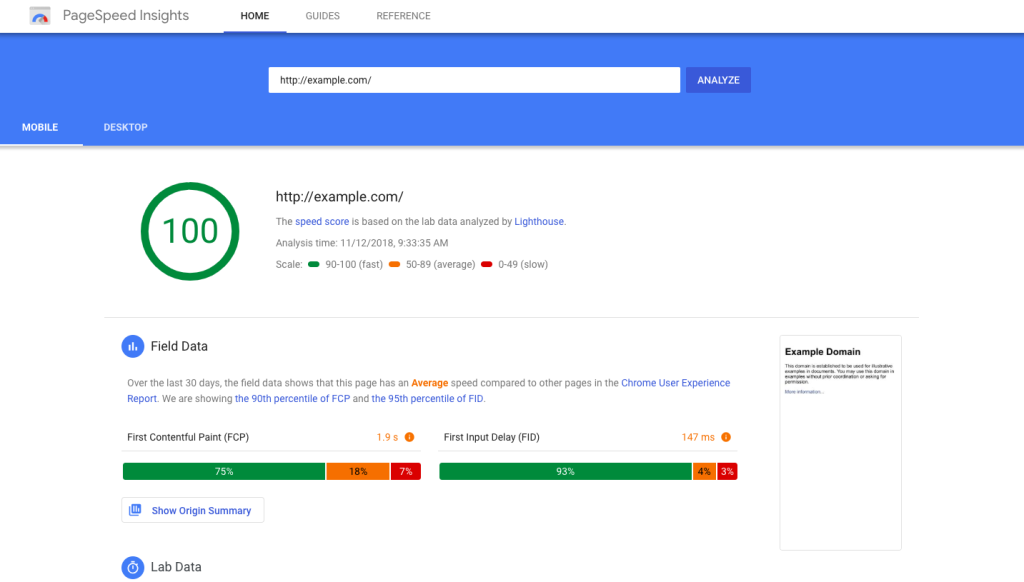
Monitor and analyze your website regularly, and use speed testing tools to analyze its performance and find what needs improving. The most important website speed tools include:
- Google PageSpeed Insights: gives detailed reports on your site’s performance on mobile and desktop, with specific recommendations for improving it.
- GTmetrix: gives your site a complete analysis, including page load time, content size and server performance.
- Pingdom Tools: gives reports on your site’s performance by location, so you can see how it performs in different regions.
- WebPageTest: lets you run detailed performance tests on different browsers and devices.
Website speed tools give you accurate data about your site’s performance, with effective suggestions for improving it.
Read also: effective steps for website maintenance.
Website speed is an important part of any online strategy. Improving your website’s performance doesn’t just improve the user experience; it directly affects engagement and conversion rates. With the tools and techniques above, you can get better performance from your website and attract more customers.
What are you waiting for? Start analyzing your site and applying these steps now to boost your success online. If you have any questions about improving your website’s speed, get in touch with the experts at Kemetova. We offer professional website maintenance services.