
As people rely more and more on online search, having your business on Google Maps has become essential, not optional. Whether you run a restaurant, a store, a service office or any other business, appearing on Google Maps can be the difference between winning a new customer and losing an opportunity. It also lets people know you exist.
In this article, you’ll learn, clearly and directly:
- What Google Maps is.
- Why you should add your business to it.
- The steps to create and manage your Business Profile on Google Maps successfully.
What Is Google Maps?
Google Maps is a free Google service that shows maps and locations with a high level of accuracy. But it’s no longer just for finding directions. It’s become a complete platform for finding local businesses, reading reviews and checking opening hours and details about services and products.
In other words, Google Maps is an online service that lets anyone search for any address anywhere in the world, with extra information about places and how to get there. With a Google Business Profile, you can grow your business by appearing in front of people searching for similar services or products.
So what is a Google Business Profile?
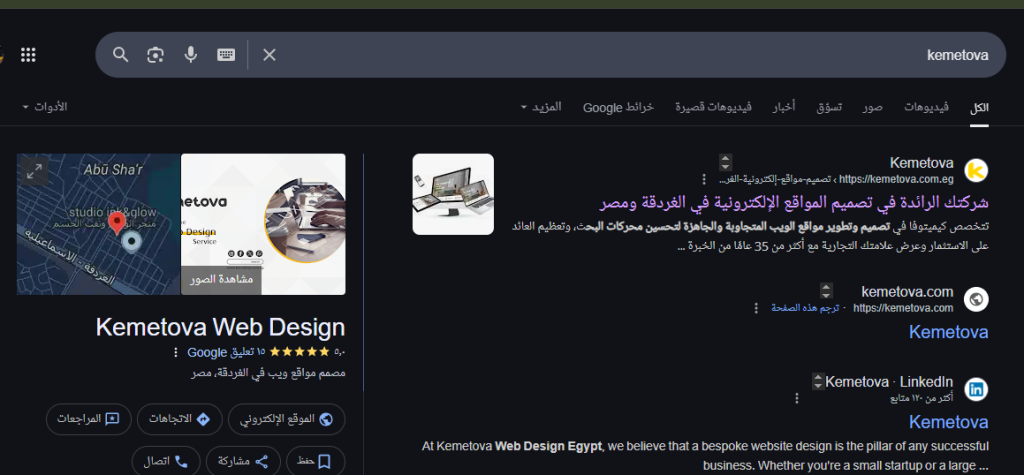
A Google Business Profile is like a business card for your company, with a summary of your business and your contact information. When someone searches for your business name or a similar business, your profile appears in Google’s search results and suggestions, like this one for Kemetova.
Why Should You Add Your Business Profile to Google Maps?
Adding your business profile to Google Maps helps you succeed in several ways:
- More visibility in local search results: when someone near you searches for a service you offer, appearing in Google Maps results makes you more visible to potential customers and helps you win new ones.
- More trust and credibility: an up-to-date business profile with good reviews and real photos raises customers’ trust in your business.
- Important contact information for customers, such as your opening hours, phone number, website link and exact location.
- Accurate, up-to-date information about your business, plus photos that show your services and products.
- Direct engagement with customers: you can reply to reviews, answer questions and share updates or special offers.
- Better local SEO: your Google Maps business profile is now an important, powerful factor in how your site appears in local search results. Here’s a guide to the most important local SEO strategies for attracting customers in your area.
Instead of you looking for customers, they’ll find you while they search. Statistics show 81% of customers search online for local businesses before buying, so a business profile on Google Maps is an important way to increase your visibility and make more sales.
Steps to Add Your Business to Google Maps
“How do I add my business to Google Maps?” is a question many business owners ask, especially local businesses. In Saudi Arabia, for example, the number of small and medium businesses passed half a million in 2020, and it’s still growing. If your business isn’t on Google Maps, customers simply won’t know you exist.
Here are the steps to add your business to Google Maps:
Create a Google Business Profile account
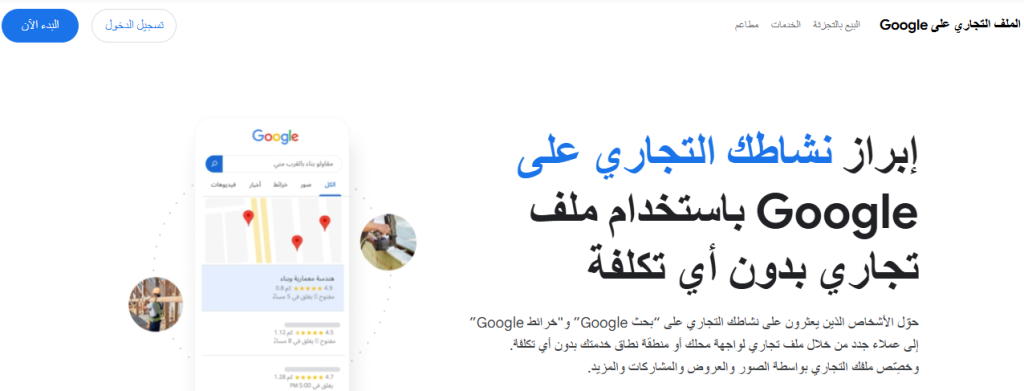
Go to Google and open the Google Business Profile setup service, then sign in with your Google account. Next, choose the option to manage a profile.
Add your business
Start by typing your business name, and make sure it isn’t already registered to another business. Then choose the category that describes your business accurately, such as an Italian restaurant or a web design company in Hurghada.
Set your location
Enter your business address clearly, including the country, street address, city and postal code, and make sure all the information is correct. Then pin your exact location by dragging the marker onto your correct address on the map.
If you offer services without a fixed location, such as home maintenance, you can set service areas instead of entering a physical address.
Add your contact information
Add your contact information, and try to include your website link to make your business profile stronger. If you don’t have a website, you can create one later to strengthen your online presence.
Once you’ve added your contact information, if you’d like updates from Google to help improve your profile, agree to receive them so you hear about new features.
Verify your business
Verification is the final step. Google often verifies your business by sending a postcard with a verification code to the address you entered, which can take up to about 16 days, to confirm your business location. It may also offer other methods, such as phone, email or video.
That completes your business profile setup, but the process doesn’t end there; you need to wait for the code to prove you own the business.
In the meantime, you can focus on improving your business by collecting positive reviews from customers. Once you’ve received the code and confirmed ownership, you can edit your business details at any time.
Read also: how to use voice search to attract customers and grow your site.
Key Tips for Improving Your Business’s Visibility on Google Maps
You can’t fully control whether your business profile appears in search results, but you can improve its chances with some important steps. These tips will help you strengthen your position and get more priority in search engines:
- Write a clear description of your business, including keywords related to your field that your customers search for.
- Add high-quality photos of your location, products or team. The more high-quality photos in your profile, the better customers’ impression of your services and products, and the more persuaded they’ll be. Photograph your products, your team, the inside and outside of your premises and your company logo.
- Set your opening hours correctly, and update them for seasonal or temporary changes.
- Ask your customers to share their reviews and opinions. It’s a chance to improve and show your business is credible.
- Reply to every review, positive or negative, professionally.
- Post regular updates about your business, such as special offers or events.
- Turn on messaging in Google Maps so customers can contact you directly.
Read also: how digital marketing helps companies reach their business goals and grow profits.
Mistakes to Avoid in Your Business Profile
- Adding inaccurate or outdated information.
- Stuffing keywords in randomly and unnaturally.
- Ignoring reviews or replying to them negatively.
- Not updating your opening hours or contact details.
Adding your business to Google Maps is a basic step toward a strong online presence. It isn’t just about appearing on the map; it’s a chance to build strong trust with local customers and grow your profits directly.
Start creating your Google Business Profile now, and don’t leave customers searching for you without finding their way to you.
If you have any questions about improving your business’s visibility in search engines, get in touch with the Kemetova team for help. We offer a full range of SEO services, as well as digital marketing and high-quality website design.